Databases are the core of storing state for almost all web applications. For that reason, taking care of the interactions with the database is crucial to make sure the application keeps running. The way to interact with most relational databases is SQL — the S*tructured Query Language. SQL makes it incredibly simple to switch the actual database system or the client using that database. It’s just SQL everywhere. You need a database driver* and then you can do the typical CRUD interactions: Create, Read, Update and D**elete data.
After reading this article, you will know when to use raw SQL, a query builder and an ORM. You will also know how to use each of them in Python.
All of the code in this article is runnable. You just need to initialize the database and add environment variables. I use direnv to set environment variables:
# direnv needed; alternatively: "source .envrc"
export DB_USER=root
export DB_PASSWORD=idontthinkso
Raw SQL
Raw SQL, sometimes also called native SQL, is the most basic, most low-level form of database interaction. You tell the database what to do in the language of the database. Most developers should know the basics of SQL. This means how to CREATE tables and views, how to SELECT and JOIN data, how to UPDATE and DELETE data. For more complex things like stored procedures, T-SQL, PL-SQL, in-depth knowledge about indices and their effect, you will have a significantly harder time finding knowledgeable people. SQL is far more powerful than many developers think. I wouldn’t know how to create the Mandelbrot set with SQL, for example.
In order to illustrate the problems of raw SQL statements, take the example of a book portal. The users can see data about books, for example, their title, original language and the author:
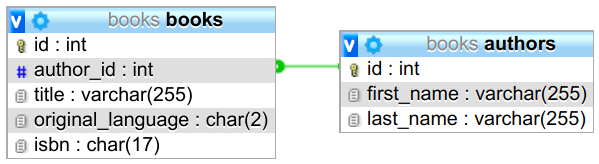
For an author page, we are given the authors.id and want to see a list of
all books.title written by that author:
import os
from typing import List

# You need to install the driver pymysql via “pip install pymysql”
import pymysql.cursors


def db_connection(f):
    """
    Supply the decorated function with a database connection.
    Commit/rollback and close the connection after the function call.
    """

    def with_connection_(*args, **kwargs):
        con = pymysql.connect(
            host="localhost",
            user=os.environ["DB_USER"],
            password=os.environ["DB_PASSWORD"],
            db="books",
        )
        try:
            rv = f(con, *args, **kwargs)
        except Exception:
            con.rollback()
            raise
        else:
            con.commit()
        finally:
            con.close()

        return rv

    return with_connection_


@db_connection
def get_titles_by_author(con, author_id: int) -> List[str]:
    cur = con.cursor(pymysql.cursors.DictCursor)
    cur.execute("SELECT * FROM books WHERE author_id = %s", author_id)
    titles = [row["title"] for row in cur.fetchall()]
    return titles


if __name__ == "__main__":
    print(get_titles_by_author(1))
The decorator is utility code that the project might use a lot.
On the positive side, it is pretty clear what happens with raw SQL. You only need knowledge of Python and SQL. No need to dig deep into third-party software.
However, there are six negative aspects about using raw SQL to be aware of.
Problem 1: SQL Injections
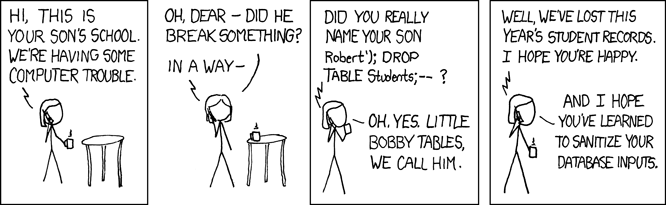
An SQL injection is an attack on services which have a placeholder in an SQL query which the attacker can fill in an unexpected way. For example:
sql = "SELECT user_id FROM users WHERE name='{name}' AND pw='{pw}';"
Given such an approach, the attacker could fill in ' OR name='admin' AND '1'='1 for the pw and leave the name empty. This would result in the query:
SELECT user_id
FROM users
WHERE name='' AND pw=''
OR name='admin' AND '1'='1'
This will basically tell the application that the user signed in as admin.
Of course, escaping the quotes and not directly pasting in user input is what you should do. But developers make mistakes. Raw SQL queries make it easy to make this mistake.
Problem 2: Typos in SQL Commands
The first obvious problem of string-programming is that typos in the sub-language cannot be detected by the editor.
sql = "SELECT * FORM books;"
Problem 3: Missing Editor Support
This problem is quite dumb, but still an open issue for many languages / editors: When developers write their SQL just in a string within their language, how should the editor know that this string needs to be parsed? How should the editor know that they want syntax highlighting and auto-completion?
You can see already in the example above that syntax highlighting is missing, but let me give you screenshots of well-known editors:



In contrast, here is the same query in a query.sql file:



I’ve tried PyCharm as well. Besides having another color for strings, it looks the same. It does not recognize that the string contains SQL.
If you really need raw queries and if you still want syntax highlighting, you
can put each query in its own .sql file. This way, the editor knows to use
SQL syntax highlighting.
Problem 4: Typos in Table or Column Names
sql = "SELECT * from boks;"
This group of errors is way harder to find. Now the checking code does not only have to know how SQL works, it also has to know your data. The database schema, to be more precise.
Problem 5: Change management
Databases change over time. With raw SQL, you typically don’t get any support for that. You have to migrate the schema and all queries yourself.
Problem 6: Query Extension
If you have an analytical query, it is nice if you can apply slight modifications to it. For example, imagine tracking data where you want to know how many users clicked on a button. You might have a “base query” for that. Depending on the use case, you might want to filter for a certain time frame or characteristics of the user. It’s possible to extend a query when you have raw SQL, but it’s cumbersome. You need to touch the original query and add placeholders.
Query Builder
Libraries which are written in the programming language you use and use native classes and functions to build SQL queries are called query builders. Query builders typically have a fluent interface. This means that the queries are built by an object-oriented interface which uses method chaining:
query = Query.from_(books).select("*").where(books.author_id == aid)
There are also graphical tools which are sometimes also called query builders, but for this article I don’t mean them.
JavaScript has Knex, PHP has Doctrine, Java has QueryDSL and JOOQ.
PyPika is an example of a query builder in Python. The example query from above can be built and executed like this:
# Core Library modules
from typing import List

# Third party modules
import pymysql.cursors
from pypika import Query, Table

# First party modules
from raw_sql import db_connection


@db_connection
def get_titles_by_author(con, author_id: int) -> List[str]:
    books = Table("books")
    q = Query.from_(books).select("*").where(books.author_id == author_id)
    cur = con.cursor(pymysql.cursors.DictCursor)
    query = q.get_sql(quote_char=None)
    cur.execute(query)
    titles = [row["title"] for row in cur.fetchall()]
    return titles


if __name__ == "__main__":
    print(get_titles_by_author(1))
Note that the resulting query is still the same as in the raw code. It was just built in another way. This means the database performance is still the same. And query building is not a complex task, so the application performance overall should stay the same.
You can also see that the connection handling is still done as before. The
total lines of code increased by 3 lines compared to the raw SQL example.
However, the query is easier to extend and reuse. For example, you could
imagine that you have a set of complex joins and a lot of WHERE statements.
With a normal SQL query, you will start to add options there. With a query
builder, it is simpler to extend and reuse queries. To make it reusable you
would expose the query q somewhere.
The query builder prevents typos in the offered parts — .select, .from_,
.where in the example above. It does not help with column names, as they are
still only strings. In other words: A query builder solves problems 1 and 2,
addresses problem 3, and still has problems 4 and 5.
ORM: Object-Relational Mapper
ORMs create an object for each database table. This way, there is a language-native representation and thus all of the language's ecosystem features, such as autocomplete and syntax highlighting, work.
ORMs are extremely popular in many languages: Java has Hibernate, PHP has Eloquent, Ruby has Active Record, JavaScript has Sequelize and TypeORM, and Python has SQLAlchemy.
Here is how the book example looks with SQLAlchemy:
# Core Library modules
import os
from typing import List

# Third party modules
import sqlalchemy
from sqlalchemy import Column, Integer, String, create_engine
from sqlalchemy.ext.declarative import declarative_base
from sqlalchemy.orm import sessionmaker

Base = declarative_base()


def db_connection(f):
    """
    Supply the decorated function with a database connection.
    Commit/rollback and close the connection after the function call.
    """

    def with_connection_(*args, **kwargs):
        # https://martin-thoma.com/sql-connection-strings/
        user = os.environ["DB_USER"]
        password = os.environ["DB_PASSWORD"]
        engine = create_engine(f"mysql+pymysql://{user}:{password}@localhost/books")
        Session = sessionmaker(bind=engine)
        session = Session()
        try:
            rv = f(session, *args, **kwargs)
        except Exception:
            session.rollback()
            raise
        else:
            session.commit()
        finally:
            session.close()

        return rv

    return with_connection_


class Book(Base):
    __tablename__ = "books"
    id = Column(Integer, primary_key=True)
    title = Column(String)
    author_id = Column(Integer)


@db_connection
def get_titles_by_author(session, author_id: int) -> List[str]:
    books = session.query(Book).filter(Book.author_id == author_id).all()
    return [book.title for book in books]


if __name__ == "__main__":
    print(get_titles_by_author(1))
A cool point about ORMs is that they sometimes help with changes. In Python, there is Alembic which can automatically detect when your models changed compared to the last known state of the database. Alembic can then create schema migration files for you. They look like this:
import sqlalchemy as sa
from alembic import op
from sqlalchemy.dialects import mysql

# revision identifiers, used by Alembic.
revision = "1cdeb9f52797"
down_revision = "057fccb0279d"
branch_labels = None
depends_on = None


def upgrade():
    op.add_column("users", sa.Column("confirmed_on", sa.DateTime(), nullable=True))
    op.add_column("users", sa.Column("registered_on", sa.DateTime(), nullable=False))
    op.add_column(
        "users",
        sa.Column(
            "status",
            sa.Enum("email_confirmation_missing", "active", name="userstatus"),
            server_default="email_confirmation_missing",
            nullable=False,
        ),
    )
    op.drop_column("users", "email_confirmed_at")


def downgrade():
    op.add_column(
        "users", sa.Column("email_confirmed_at", mysql.DATETIME(), nullable=True),
    )
    op.drop_column("users", "status")
    op.drop_column("users", "registered_on")
    op.drop_column("users", "confirmed_on")
It requires initial effort to represent the database within the code so that there are objects which represent the tables of the database. After that initial effort, you need to make sure that the database is in sync with the ORM code base. What you get from that effort is faster development when you just need to write new queries. As you can also get syntax highlighting and auto-formatting, it could also reduce maintenance by making the queries easier to read.
Over-fetching Problem
When you fire queries with ORMs, you tend to get more than you need. For example, if you wanted to use the ORM directly for the book query from above, you would define the foreign key like this:
# Core Library modules
import os
from typing import List

# Third party modules
from sqlalchemy import Column, ForeignKey, Integer, String, create_engine
from sqlalchemy.ext.declarative import declarative_base
from sqlalchemy.orm import relationship

# First party modules
from orms import db_connection

Base = declarative_base()


class Author(Base):
    __tablename__ = "authors"
    id = Column(Integer, primary_key=True)
    first_name = Column(String)
    last_name = Column(String)
    books = relationship("Book")


class Book(Base):
    __tablename__ = "books"
    id = Column(Integer, primary_key=True)
    title = Column(String)
    author_id = Column(Integer, ForeignKey("authors.id"))
    author = relationship("Author")


@db_connection
def get_titles_by_author(session, author_id: int) -> List[str]:
    author = session.query(Author).filter(Author.id == author_id).one()
    return [book.title for book in author.books]


if __name__ == "__main__":
    print(get_titles_by_author(1))
Then the database receives those two queries:
SELECT authors.id         AS authors_id,
       authors.first_name AS authors_first_name,
       authors.last_name  AS authors_last_name
FROM   authors
WHERE  authors.id = 1;

SELECT books.id        AS books_id,
       books.title     AS books_title,
       books.author_id AS books_author_id
FROM   books
WHERE  1 = books.author_id
This is inefficient for multiple reasons:
- I didn’t want author information at all.
- The database needs to execute two queries instead of one.
- I didn’t want the book's ID or the author's ID. Of course, this is a tiny example where it doesn’t matter. But imagine your query would return several hundred rows and also have several hundred columns. And maybe some would be filled with rather big content, e.g. a LONGBLOB.
Of course, you can do something like that:
which results in this query:
SELECT authors.id         AS authors_id,
       authors.first_name AS authors_first_name,
       authors.last_name  AS authors_last_name,
       books_1.id         AS books_1_id,
       books_1.title      AS books_1_title
FROM   authors
       LEFT OUTER JOIN books AS books_1
                    ON authors.id = books_1.author_id
WHERE  authors.id = 1
Now this is even worse. I first made this as a mistake, but I think this shows perfectly how you can get the right result but in a very complex way when using an ORM. The correct way, of course, would be:
Which results in this query:
SELECT books.title AS books_title
FROM   books,
       authors
WHERE  authors.id = 1
The point of this example is not that ORMs make it hard to do the right thing. The last example is certainly easy to understand. But they also make it easy to create queries which are wrong in a subtle way. Imagine you received the orms2.py or orms3.py example to review. They do the right thing, the unit tests are not terribly slow either. Would you be certain to spot the unnecessary complexity? Also when the desired query gets way more complex?
For raw SQL and query builders, you have to go out of your way to come up with similarly complex queries. There it is hard to write a too complex query and it’s easy to spot them.
The N+1 Problem: Initial Under-Fetching
Imagine you want to print a list of all books with the author names. In raw SQL, you would execute this query:
SELECT b.id,
       b.title,
       a.first_name,
       a.last_name
FROM   books AS b
       LEFT JOIN authors AS a
              ON b.author_id = a.id
With an ORM, you might be tempted to do this:
It looks fine because you don’t see a session.query in the for-loop, but for
every element in there, it fires one query. So if you have received n books in
the first query, you will execute n queries you’re potentially not aware of.
You have n+1 queries instead of 1.
The Leaky Abstraction Problem
Abstraction is a two-sided coin: On the one hand, it simplifies things. The developer does not have to deal with the details of the database interaction and query building. On the other hand, developers are not aware of what they actually query from the database or how many queries they send. For this reason, some interactions are more inefficient than they need to be (example). The ORM might not know that just in the next line of code a very similar query is fired which could be combined with the first one. For example, imagine that you have a book portal where people can give a list of authors and you return them the list of all books written by those. You might be tempted to do something like this:
Now you send a query once for each author. Of course, you can do that in a single query. And you should, because although the loop above does not seem too bad, you have a network connection in between. This is how you do it with a single query:
Bonus: LINQ
Language Integrated Queries (short: LINQ) are available in C# and might be a built-in solution for the problems query builders try to solve. Here is an example from Wikipedia:
var results =  from c in SomeCollection
               where c.SomeProperty < 10
               select new {c.SomeProperty, c.OtherProperty};
That’s extremely neat, isn’t it?
Query Types and Gradual Changes
I’ve used a very simple example query. Of course, queries can become way more complicated. I have written myself queries which have several hundred lines. There are two groups of workloads which are typically distinguished: OLTP and OLAP. OLTP workloads have a large number of small inserts / updates / deletes, whereas OLAP workloads run a small number of complex select queries for analysis.
Of course, if you are in a scenario where most of your queries are rather simple, it is easy to switch to a query builder or an ORM. But if you have complex queries the switch to an ORM might even be impossible.
This is where gradual changes come into play. Similar to how Python supports gradual typing, some ORMs / Query Builders allow you to use raw SQL. And some query builders allow you to first use strings for the table and column names and transition as you like to objects. If you can just take the amount of abstraction that feels natural, your development speed is not hindered. If you have a complex query which you first want to get right, just write it raw. Changing it to an expression by a query builder later is still possible.
Conclusion
Raw SQL is for sure the most powerful way to interact with your database as it is the database's native language. The drawback is that you might use features which are specific to that database, which makes a future database switch harder. Another drawback is that core editor features like syntax highlighting and autocompletion are missing. Extending queries is cumbersome and the risk of SQL injections is higher.
Query Builders add little development overhead and no relevant runtime overhead compared to raw SQL and prevent typos in the SQL keywords. They make extending queries easier and make SQL injections harder.
ORMs provide the highest form of abstraction and prevent typos not only in SQL keywords, but also in the table and column names. They take longer to get started than query builders — both from a learning curve perspective and from the perspective of initial development overhead. As they abstract away a lot, there is a higher risk of executing expensive queries or too many queries.
Credits
A huge thank you to Marcel Kost and Adrian Vogelsgesang who pointed out many interesting aspects for this article. They build the Hyper Database that is used inside Tableau, so they are the experts when it comes to complicated queries and how the database systems deal with those. Thank you 🤗