Email spoofing is the creation of emails with a forged sender address. Faking the sender's address is often a part of a phishing attack. There are different ways to fool the victim of a phishing attack about who is the real sender: Using slightly different sender domains like [email protected] instead of [email protected], hiding the sender's address like in PayPal Security <[email protected]>, or spoofing the email address.
Why it Matters
Business Email Compromise (BEC) is a form of fraud that uses a business email address. There are many examples of this, but they are not well documented. At least not publicly. Some of the bigger ones I’ve found are:
- 2014: The drug company Upsher-Smith Laboratories lost \$50 million USD by CEO fraud (source)
- 2015: The networking company Ubiquiti Networks lost \$46.7 million USD to a scammer who impersonated employees (source)
- “In 2018, the IC3 received 20,373 BEC/E-mail Account Compromise (EAC) complaints with adjusted losses of over \$1.2 billion” (source)
How are emails spoofed?
Emails are transferred via the SMTP protocol. This protocol has an envelope that contains the sender (MAIL FROM) and the recipient (RCPT TO). The sender is typically not verified and not displayed. Instead, the content of the mail contains additional metadata. Two items there are the reply-to and the sender. It’s interesting that reply-to and sender are different.
As an attacker, one can manipulate everything. Just like with normal mail:
- Write a wrong MAIL FROM
- Claim within the mail you’re another person (sender)
A key difference here is that typically, a lot is handled in the background.
To make it clear that this is super easy and the attackers are not doing rocket science, here is how an email can be sent with Python:
import smtplib
from email.message import EmailMessage

msg = EmailMessage()
msg.set_content("You've been a good boy")

msg["Subject"] = "Ho-ho-ho"
msg["From"] = "[email protected]"  # The fake sender
msg["To"] = "[email protected]"  # The actual receiver
# msg.add_header("reply-to", "[email protected]")  # The attacker's address

# Send the message via our own SMTP server.
# On Ubuntu, you need to install sendmail:
#     $ apt-get install sendmail
s = smtplib.SMTP("localhost")
s.send_message(msg)
s.quit()
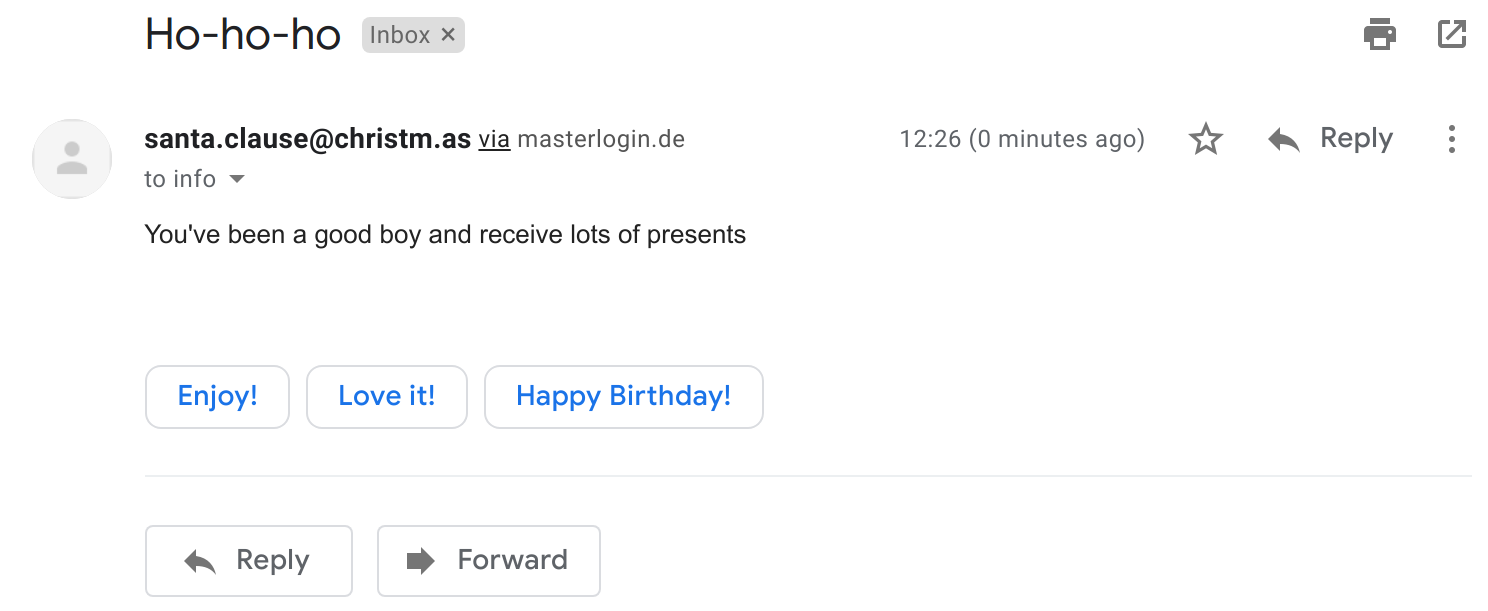
Which then looks like this in Gmail:

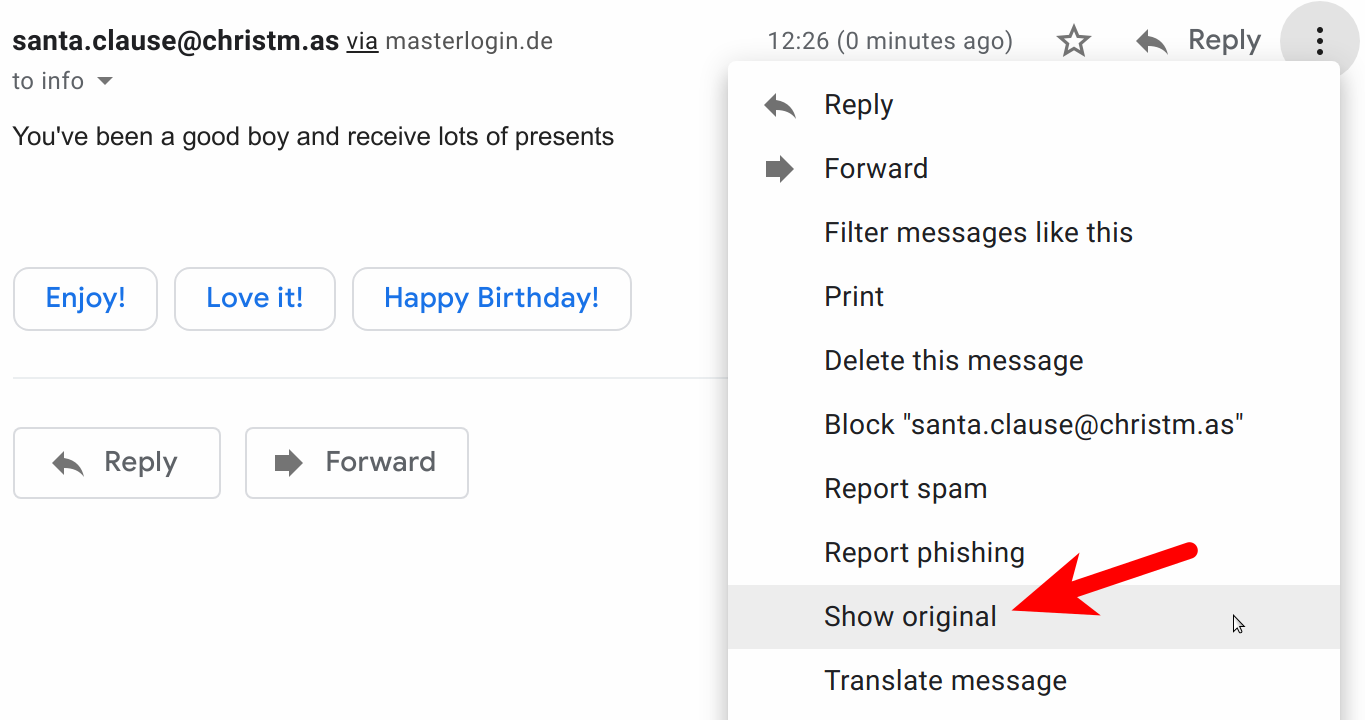
When I click on it, I see this:
Even when I look at the details, I see:
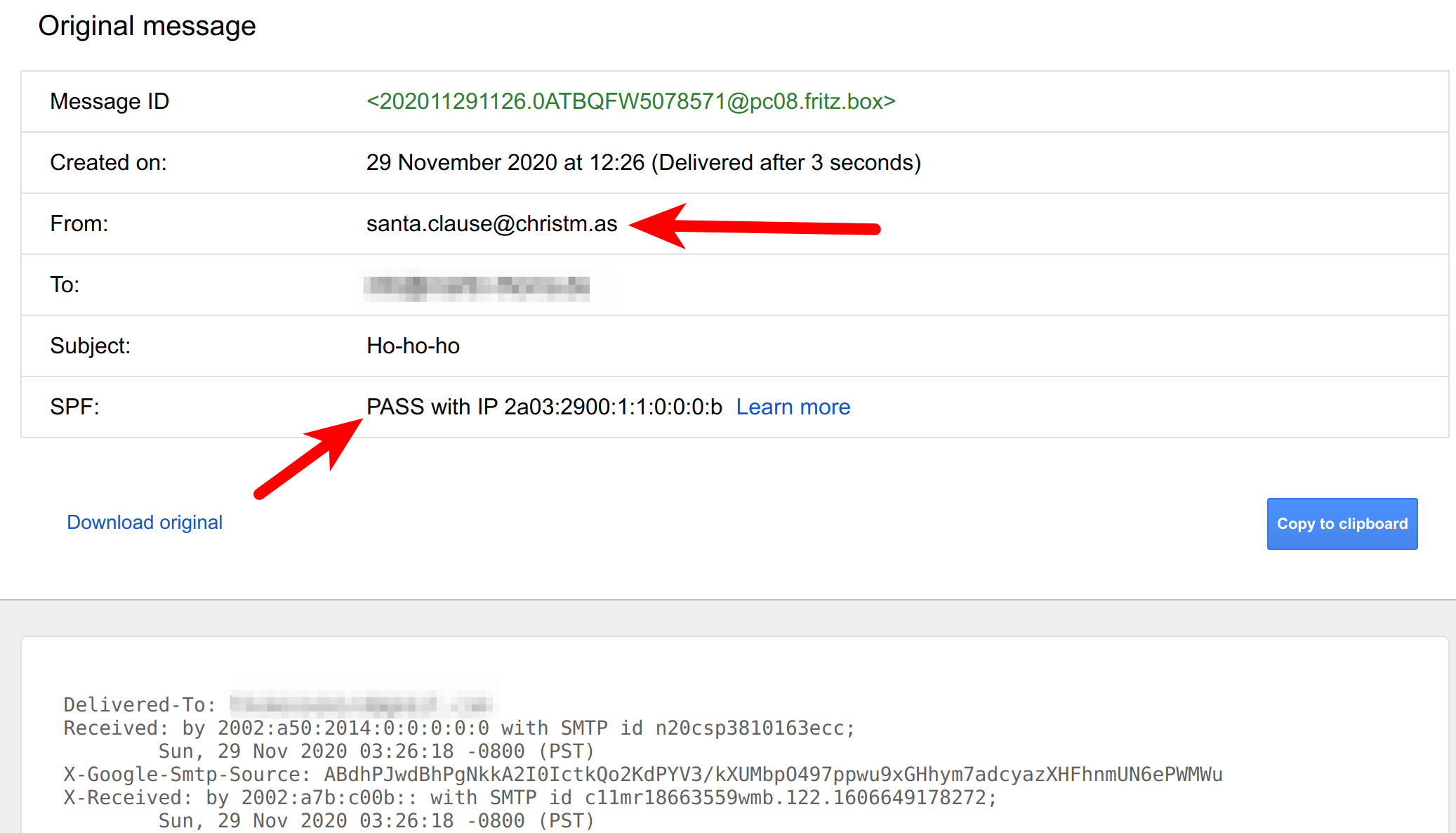
The attacker might also put a reply-to in the mail:
msg.add_header("reply-to", "[email protected]")
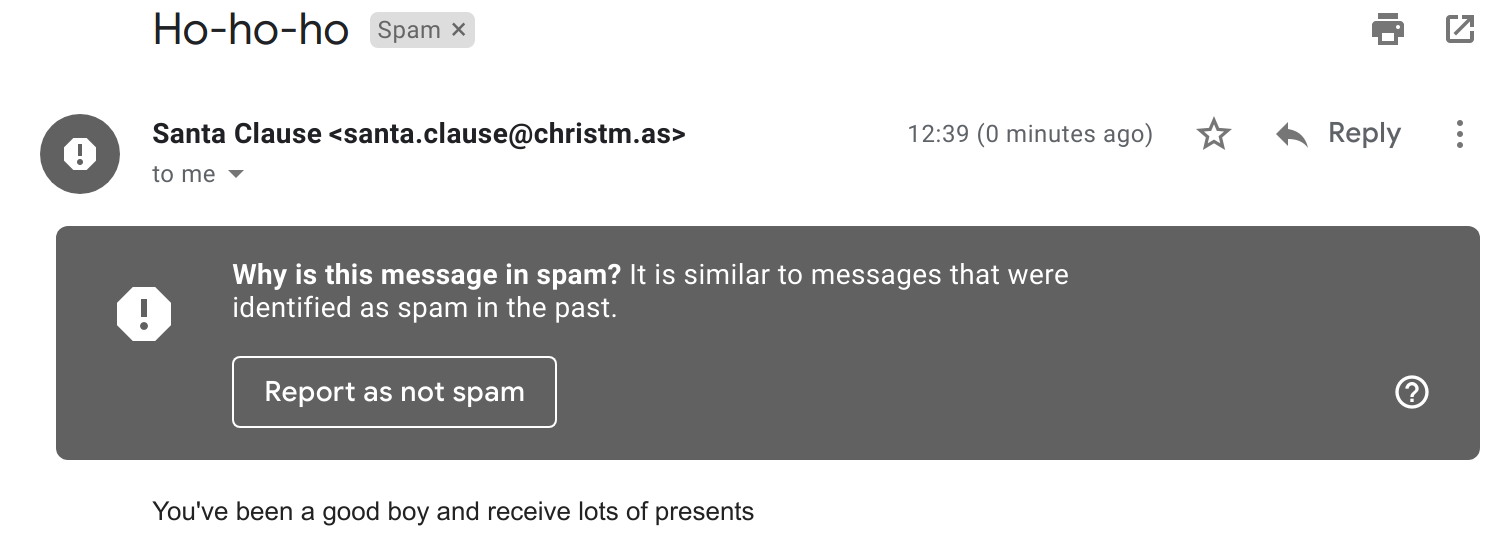
The attacker can also add a name to the email address:
from email.utils import formataddr

fake_address = "[email protected]"
msg["From"] = formataddr(("Santa Clause", fake_address))
Interestingly, that triggered Gmail's spam detection:
How can I prevent Email Spoofing?
- SPF (Sender Policy Framework) is an email authentication method designed to detect forged sender addresses in emails. Domain owners (e.g. me for martin-thoma.com) can publish SPF records to DNS. In that record, they whitelist IP addresses that can send emails for their domain. Email servers can then perform an SPF lookup when they receive an email for the (claimed) sender's domain. That prevents spammers from using your domains in the email envelope. When spammers do, the receiving email server can check the SPF record and either reject the email completely or mark it as spam. More information can be found at open-spf.org.
- DKIM (DomainKeys Identified Mail) is an email authentication method designed to detect forged sender addresses in emails. It works by cryptographically signing sent emails from a given domain. This is not a signature per person, but a signature for your organization. The corresponding public key is published to the DNS records where email servers that receive those mails can get it and verify it. DKIM makes sure that nobody tampered with the email after it was sent. Imagine DKIM like a seal. SPF then is the knowledge which seal should be used.
- DMARC (Domain-based Message
Authentication, Reporting, and Conformance) is an email authentication
protocol. DMARC uses SPF and DKIM and gives policies on how to deal with
error cases. The domain owner creates a DMARC DNS record that contains
instructions on what to do with messages that failed the SPF / DKIM test.
Received emails that failed can on the receiver side either be rejected or
quarantined. If that happens, DMARC can be configured to send a report back.
DMARC enforces an alignment: The domain in the
Fromheader has to match the domain that SPF validated (MAIL FROM) or thed=domain of the DKIM signature. This can be problematic for newsletters but also represents what users expect.
As a domain owner, you can look up your SPF record like this:
$ dig google.com txt | grep spf
google.com.  3600 IN TXT "v=spf1 include:_spf.google.com ~all"
To verify DKIM, look in an email you received for this:
DKIM-Signature: v=1; a=rsa-sha256; c=relaxed/relaxed; d=medium.com; \
h=content-type:from:mime-version:reply-to:to:subject:list-unsubscribe; \
s=m1; bh=NY62YFtbfuXkL/SNoiClZV8gaZxkiYhFD4J77gUHGEY=; \
b=EL3HbaL iSgAJsE6LO8L10T52+rYyump4R1aMAV9nCwyXLENaxbS0xgZvksgoplu8Rjo/wWV J0jDEFRe+UsOnIhaCTBXa1H7LVdjkRyOu9+9Qwd7hlWY5fx/mtRQXvWRDfe9KEsS 9WH8o0lRbOAq7AJXPLID/tZokm+KIMmMc/H0=
The record is structured in tag=value pairs which are separated by ;:
v: DKIM versiona: The signature algorithm, typically rsa-sha256c: The canonicalization algorithm. The first value is for the header, the second one for the body of the email.d: The used domain.h: The headers.s: The DKIM selector record name.b: The base64-encoded signature of the headers listed inh.bh: The base64-encoded hash of the body of the email.
You can look up your DMARC record like this:
$ dig _dmarc.google.com txt | grep DMARC
_dmarc.google.com. 290 IN TXT "v=DMARC1; p=reject; \
    rua=mailto:[email protected]"
The record is structured in tag=value pairs which are separated by ; (source):
v: The protocol version.p: The policy. It should typically bereject, but can also bequarantineornone.rua: The reporting URI for aggregate reports (how the domain is used)ruf: The reporting URI for forensic reports (showing when validation failed)pct: The percentage of emails that get handled with DMARC. You can set this to an integer from 0 to 100. For the beginning, you can set it low for testing. It should become 100 over time. If you don’t use the tag at all, it defaults to 100%.
Summary
Spoofing emails is easy.
As a system administrator, you can protect your company by setting an anti-phishing policy in Office 365 or review the advanced phishing and malware settings of G Suite.
As a domain owner, make sure you have SPF, DKIM, and DMARC configured correctly to protect your customers or clients.
More in this series
In this series about application security (AppSec), we already explained some of the techniques of the attackers 😈 and also techniques of the defenders 😇:
- Part 1: SQL Injections 😈🐝
- Part 2: Don’t leak Secrets 😇
- Part 3: Cross-Site Scripting (XSS) 😈🐝
- Part 4: Password Hashing 😇
- Part 5: ZIP Bombs 😈
- Part 6: CAPTCHA 😇
- Part 7: Email Spoofing 😈
- Part 8: Software Composition Analysis (SCA) 😇
- Part 9: XXE attacks 😈🐝
- Part 10: Effective Access Control 😇
- Part 11: DoS via a Billion Laughs 😈
- Part 12: Full Disk Encryption 😇
- Part 13: Insecure Deserialization 😈🐝
- Part 14: Docker Security 😇
- Part 15: Credential Stuffing 😈🐝
- Part 16: Multi-Factor Authentication (MFA/2FA) 😇
- Part 17: ReDoS 😈
The following articles are about to come:
- Part 18: Secure Messaging 😇
- Part 19: Cryptojacking 😈
- Part 20: Backups 😇
- Part 21: Cryptotrojans 😈
- Part 22: Single-Sign-On 😇
- Part 23: Clipboard Hijacking 😈
- Part 24: Certificates 😇
- Part 25: Race Condition Attacks in Blockchains 😈
- Part 26: Mobile Device Management (MDM) 😇
- Part 27: Server-Side Request Forgery (SSRF) 😈
- Part 28: Network Separation 😇
- Part 29: Social Engineering (including Phishing) 😈
- Part 30: Virtual Private Networks (VPNs) 😇
- Part 31: CSRF 😈
Let me know if you are interested in more articles around AppSec / InfoSec!