I love thinking about perfect designs for everyday objects. Here is my idea for a perfect security camera. For the cameras that exist today, see Home Security Cameras 2025.
The core principle that all security cameras I know violate is a local-first approach. The camera should still work, even if you have no internet connection. That is possible if you're in the same network as the camera.
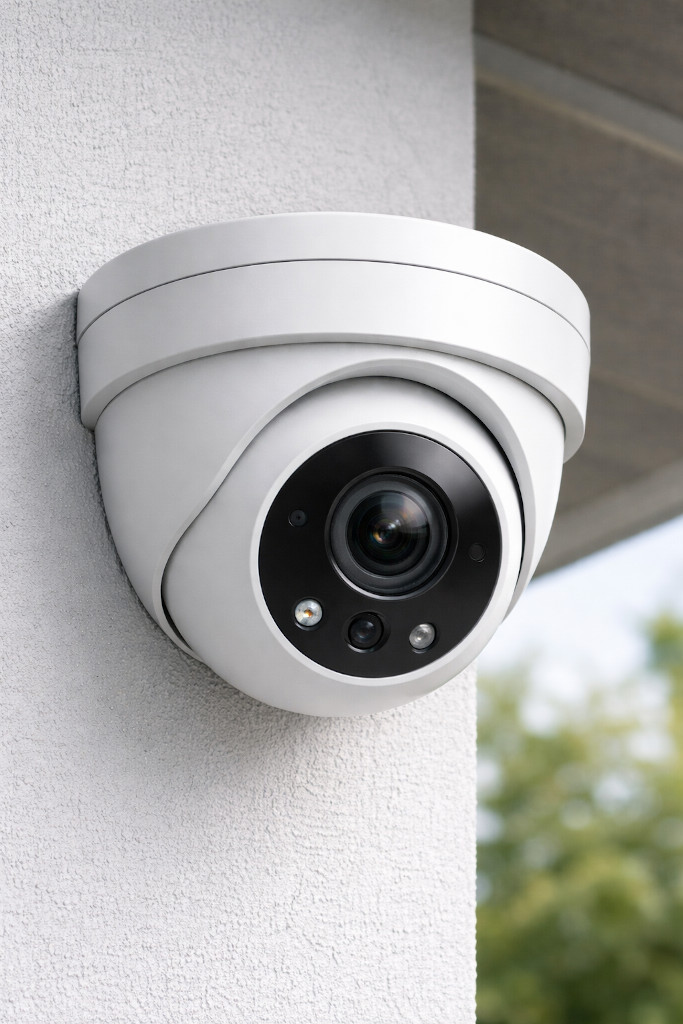
Hardware
- Form factor:
- Turret style for easy camera angle adjustment (in contrast to bullet cameras)
- Mounting: Adjustable mount for wall or ceiling installation
- Camera:
- High-resolution sensor
- Wide-angle lens
- Infrared night vision
- Microphone and speaker for two-way audio
- Power:
- Built-in battery for power outages
- Power-over-Ethernet (PoE) support
- USB-C power input as an alternative, with the option to use solar panels
- Storage: microSD card slot for local storage
- Connectivity:
- Wi-Fi
- Ethernet (with PoE, see "Power")
- Bluetooth for initial setup
- Miscellaneous:
- LED to illuminate the area (both infrared and visible light)
- Status LED (configurable to be off during operation)
- Physical privacy shutter
- Weatherproof casing (IP65 or higher)
- Tamper-detection sensor
- On-device clock
Software
On-Device Software
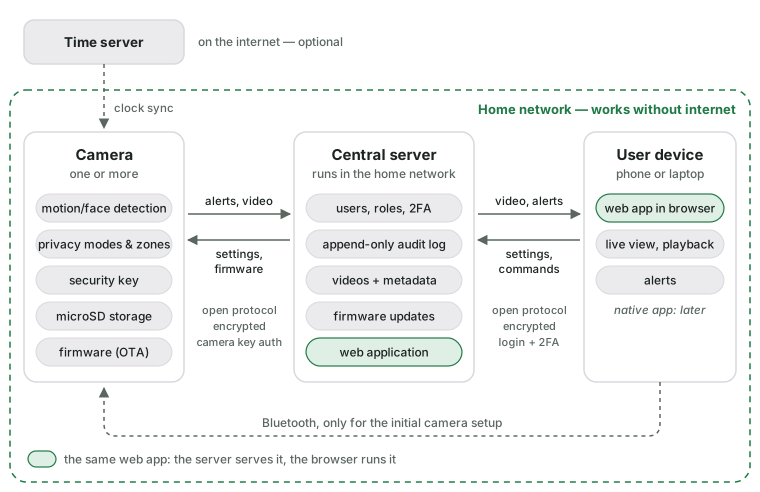
- Detects motion and faces locally
- Includes a built-in security key to authenticate itself to the central server
- Supports Bluetooth for initial setup
- Synchronizes the on-device clock with a time server
- Supports over-the-air (OTA) firmware updates from the central server
- Setting up privacy modes (e.g., disable recording at certain times) and zones (e.g. masking out certain areas in the camera view) locally on the device
- Keeps recording to the microSD card when the central server is not reachable and uploads the recordings later
Central Server Software
The central server runs inside the home network, e.g. on a NAS or a Raspberry Pi. Cameras and users in the same network don't need an internet connection; remote access (e.g. via VPN) is optional.
Alerts:
- Receives motion and face alerts from the cameras
- Forwards them to the users (e.g. push notification or e-mail) according to per-camera rules (times, zones, known faces)
Authentication:
- Allow multiple users with different roles
- Admin: Full access to all cameras and settings; allow adding new users; allow adding and removing cameras
- Home-User: Access to all cameras of a household; allow changing the angle of cameras; allow receiving alerts; allow enabling lights or using two-way audio
- Allow setting up two-factor authentication (2FA)
Security:
- Audit log of all access and changes. This log cannot be changed, even by admins.
Storage:
- device metadata (online/offline timestamps and installed firmware versions)
- recorded videos with timestamps and associated camera
End-User Application
This could be a native mobile app, but for a start a web application would be sufficient. This web application can run on the central server.
Frontend:
- Overview page: All cameras with the latest snapshot
- Camera detail page:
- Live view
- Recorded videos:
- Playback
- Download
- Camera settings
- Firmware update
- Alert history
Camera ↔ Server Communication Protocol
- Open and publicly documented
- Cryptographic authentication of the camera
- Encrypted communication channel
- Camera can push alerts to the server
- Camera can stream live video and upload recordings to the server
- Server can send settings, commands (e.g. move, light, two-way audio) and firmware updates to the camera
End-User App ↔ Server Communication Protocol
- Open and publicly documented
- User authentication
- Encrypted communication channel